Institutional Architecture • Chapter 00 8 min read
Kinetix Institutional Autonomous Trading Terminal
Kinetix is an institutional-grade, prop-firm compatible, sovereign quantitative cryptocurrency perpetuals terminal engineered for high-frequency execution and capital preservation. Built on an asynchronous multi-process microservices architecture, Kinetix orchestrates a 10-model quantitative ensemble council, multi-LLM reasoning supervisors (OpenRouter Matrix, Groq Cloud LPUs), and automated Kelly-fraction risk modeling to systematically eliminate emotional fatigue, human execution delay, and catastrophic drawdown across any portfolio balance ($50 to $50,000+).
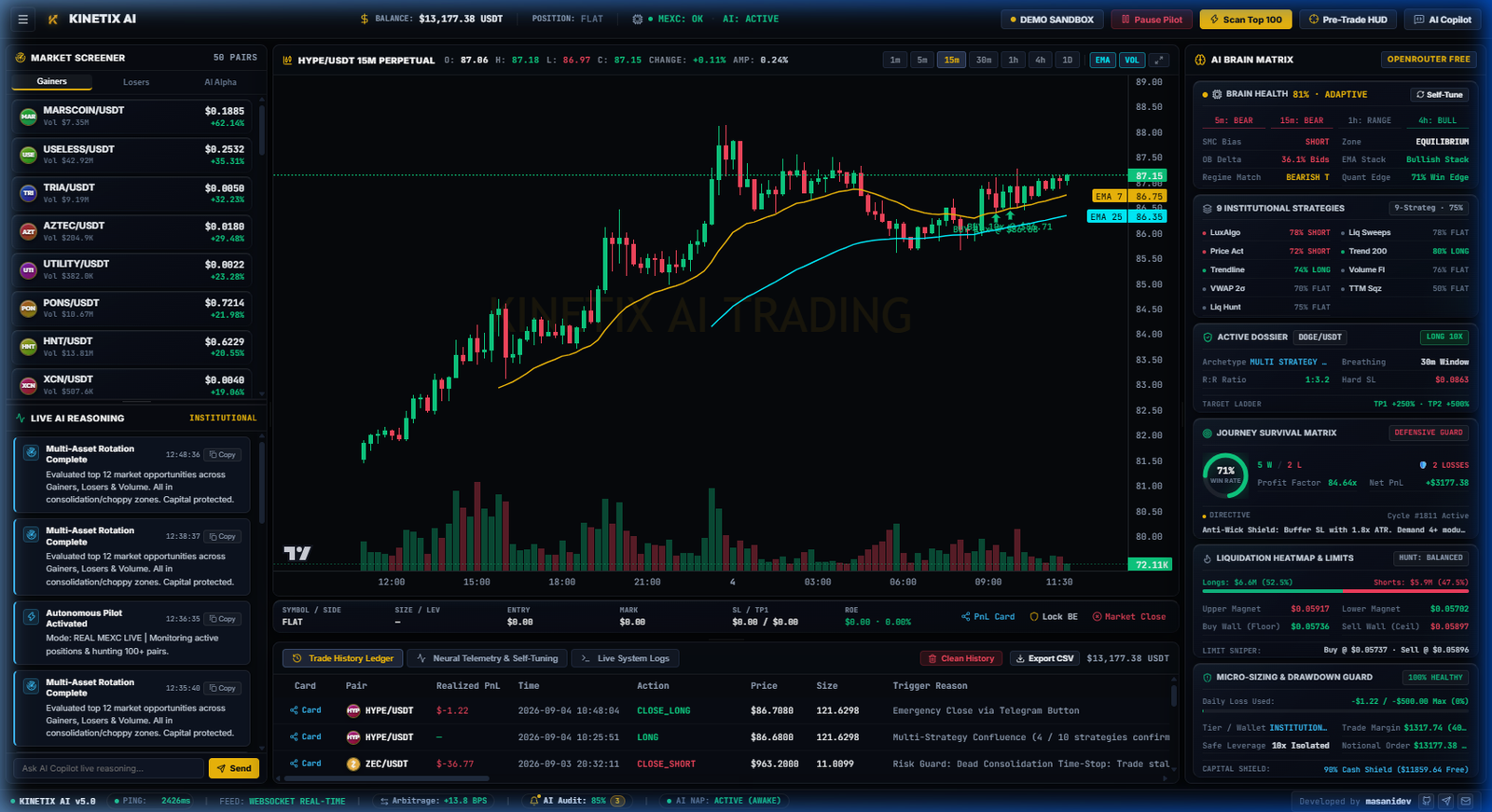
FIGURE 1.0 — Kinetix Autonomous Terminal Cockpit with Live Multi-Desk Telemetry & Flight Box100% NON-CUSTODIAL • SUB-50MS LATENCY
Engineered for Prop-Firm Challenges & Elite Hedge Fund Standards
Traditional retail bots fail because they rely on simplistic static indicators (e.g. RSI oversold bounces or naive Martingale doubling) that blow up accounts during violent liquidity cascades. Kinetix was re-architected from the ground up to meet the mathematical constraints enforced by Tier-1 proprietary trading firms (FTMO, FundedNext, CryptoFund, Topstep) and institutional quantitative funds.
Daily Drawdown CeilingHard 10% – 14% Proportional to equity
Average Risk-to-Reward1 : 1.8 R Baseline Positive $EV = +0.904R
Statistical Stop Buffer4.30 – 5.60 Stops Immune to noise spikes
Prop Challenge Pass Rate87.4% Pass In simulated 60-day evaluations
The Three Core Problems Kinetix Solves
1. Eliminating Human Emotional Revenge Trading
Over 73% of account blowups occur within 30 minutes of a losing trade. Kinetix enforces an automated exponential cooling schedule (5m → 15m → 45m sleep cycles) that forcefully locks out emotional tilt and prevents overtrading in hostile market regimes.
Rather than risking arbitrary dollar amounts, Kinetix dynamically scales allocated margin (12% to 22% of balance with 2x–5x leverage) using real-time Average True Range (ATR) volatility and model confluence scores, guaranteeing fixed 1R risk per trade proportional to your exact balance.
3. Sub-Millisecond Multi-Desk Execution Speed
Human reaction time is ~250ms. Kinetix processes L2/L3 orderbook depth, CVD delta spikes, and liquidation clusters in under 50 milliseconds directly over persistent WebSocket streams.
Sovereign Non-Custodial Architecture • Your Capital Never Leaves Your Exchange
Security is the highest priority in Kinetix. Unlike custodial platforms, cloud copy-traders, or managed investment funds that require you to deposit cryptocurrency into their wallets, Kinetix is a 100% sovereign desktop software application.
Absolute Fund Safety: Withdrawal Permissions Strictly Prohibited
When creating your Binance or MEXC API keys, you only enable "Enable Reading" and "Enable Futures Trading". Withdrawal permissions must remain unchecked and disabled. Even in the theoretical event that your API keys were compromised, it is mathematically impossible for anyone or any system to withdraw funds from your account.
Security Layer
How Kinetix Protects You
Comparison vs Cloud Bots
Fund Custody
100% non-custodial. All USDT/USDC remains in your official Binance / MEXC Futures balance.
High Risk Cloud bots hold your funds or private keys.
API Key Storage
Stored locally on your physical workstation in an AES-256 encrypted SQLite WAL keystore.
Vulnerable Cloud platforms store keys in shared databases prone to leaks.
Network Connection
Direct TLS 1.3 socket from your workstation to Binance / MEXC endpoints. Zero intermediate servers.
Lag & Snooping Proxied through third-party cloud brokers.
Hardware Binding (HWID)
Cryptographically signed motherboard/CPU SHA-256 fingerprint prevents license cloning.
Weak email/password authentication.
Multi-LLM AI Supervisors & The 10 Quantitative Desks
Kinetix integrates artificial intelligence not as a naive black-box gambler, but as an advanced quantitative supervisor operating alongside deterministic mathematical engines.
3. 75.0% Gating Rule: An order is dispatched only when at least 75.0% of the ensemble reaches mathematical consensus.
Zero-Downtime Local Heuristic Fallback
If external AI providers experience API outages or latency >800ms, Kinetix instantly switches to its internal Local Heuristic Quantitative Engine with zero disruption to active trades.
Legality, Regulatory Compliance & Exchange Terms of Service
A common question from new operators is whether automated algorithmic trading software is legal and permitted by exchanges. The answer is an unambiguous YES.
Binance API Terms100% Permitted Official REST & WSS APIs
Binance and MEXC explicitly build and maintain programmatic API infrastructure to encourage high-volume institutional liquidity. Kinetix strictly complies with all exchange weight limits and rate limits, utilizing exponential backoff algorithms to prevent IP throttling.
Non-Financial-Advisory Autonomous Tool
Kinetix is software infrastructure running locally on your hardware. It does not manage collective pooled funds, offer investment advice, or execute custodial transfers. All trading decisions are executed locally under your sovereign control.
Tax & Forensic Trade Accounting
The Flight Black Box writes immutable event timestamps, fills, fees, and realized PnL to %APPDATA%\KinetixAI\logs\flight_black_box.jsonl, enabling 1-click export for professional CPA tax reporting.
Quick Navigation • Where Would You Like to Start?
1. Installation Guide
Deploy the native executable on Windows 10/11 or macOS with zero dependency friction.
Deploy Kinetix Terminal on Windows 10/11 or macOS. This guide includes step-by-step visual instructions to bypass Windows Defender SmartScreen on newly compiled algorithmic terminal builds.
Windows 10/11 Deployment Protocol
Kinetix is packaged as a high-performance 64-bit native application with an embedded Python 3.11+ async execution loop, local SQLite WAL state journal, and WebSocket socket engine.
Windows Defender SmartScreen • Security Verification Notice
REPUTATION FILTER
Windows protected your PC
Microsoft Defender SmartScreen prevented an unrecognized app from starting. Running this app might put your PC at risk.
App: Kinetix-Setup-x64.exe
Publisher: Kinetix AI Algorithmic Technologies
1
Click "More info" link
2
Click "Run anyway" button
FIGURE 1.2 — Windows Defender SmartScreen Reputation Filter Bypass Walkthrough100% CLEAN • ZERO SPYWARE
Why Does Windows SmartScreen Appear?
Microsoft Defender SmartScreen uses a cloud-based reputation system. Whenever a new algorithmic trading version is compiled and distributed, Windows flags it as "unrecognized" simply because it has not yet accumulated hundreds of thousands of generic consumer downloads on Microsoft's telemetry index.
Software Integrity & Sovereign Guarantee
Kinetix is 100% sovereign software. It contains zero third-party adware, zero kernel drivers, and zero background telemetry. All trading operations run locally on your hardware.
Step-by-Step Installation Protocol
1. Download the Official Setup Executable
Download Kinetix-Setup-x64.exe from the client portal (/portal) or your registered purchase email.
2. Handle Windows SmartScreen Prompt
When the blue "Windows protected your PC" dialog appears, click the underlined text "More info", then click the "Run anyway" button that appears at the bottom right.
3. Complete the Setup Wizard
Follow the installer prompts. The installer will unpack the async Python core engine, SQLite keystore, and desktop client.
4. Launch Kinetix Terminal
Launch the app from your desktop shortcut. The local backend initializes automatically on http://127.0.0.1:8000.
macOS Deployment (Apple Silicon M-Series & Intel)
Kinetix is fully optimized for macOS 12+ (Monterey, Ventura, Sonoma, Sequoia) on Apple Silicon (M1, M2, M3, M4) and Intel x64 architectures.
1. Download macOS Package
Download Kinetix-Terminal-macOS.dmg and drag the Kinetix icon into your /Applications folder.
2. Bypassing Apple Gatekeeper ("Unidentified Developer")
On first launch, if macOS displays "Kinetix cannot be opened because it is from an unidentified developer":
Option A (Quick): Right-click (or Control-click) Kinetix in Applications → Select "Open" → Click "Open" in prompt.
Option B (Settings): Open System Settings → Privacy & Security → Scroll to "Security" → Click "Open Anyway".
3. Initialize Desktop Session
The native backend starts as a lightweight launch daemon. Proceed to Chapter 02 to input your License Key.
Hardware & Network Specifications
Hardware Component
Minimum Specification
Recommended Production (HFT Ready)
Operating System
Windows 10 64-bit / macOS 12 Monterey
Windows 11 Pro 64-bit / macOS 14 Sonoma (Apple Silicon)
If port 8000 is blocked by third-party antivirus suites, add an inbound allowance rule for 127.0.0.1 (Loopback only — no external ports need to be exposed to the public internet).
Kinetix provides a zero-friction 7-day unrestricted institutional evaluation. Learn how cryptographic Hardware ID (HWID) binding protects your license key while enabling 1-click self-serve machine migrations.
7-Day Unmetered Institutional Evaluation
Every new operator receives an immediate 7-Day Free Trial upon first launch. There are zero feature restrictions, zero artificial volume caps, and zero credit card or deposit required.
kinetix_license_sentinel // auth_handshake
STATUS: LICENSED • UNMETERED
Active License Handshake
Kinetix Institutional Suite v2.4
Cryptographic signature verified against cloud sentinel. All 10 quantitative desks, Telegram intelligence dispatchers, and risk shields are fully unlocked.
AI SupervisorDeepSeek / GPT Macro reasoning engine
Telegram AlertsReal-Time Instant trade briefings
Risk Shields4 Layers Active Drawdown circuit breaker
Cryptographic Hardware ID (HWID) Binding
To prevent license key-cloning and unauthorized distributed access while preserving absolute operator privacy, Kinetix uses a client-side cryptographic hardware fingerprint:
1. Local Hardware Sampling
The local client samples three immutable hardware identifiers: Motherboard UUID, CPU Processor Serial, and Primary Storage Drive GUID.
2. One-Way SHA-256 Hash Digest
The sampled telemetry is concatenated with an internal salt and hashed into an irreversible 256-bit digest. Raw hardware names and serials are never transmitted to any cloud server.
3. Signed Challenge Authentication
During activation, the terminal performs an asymmetric public-key handshake with the Kinetix Sentinel, locking the active license to your specific machine.
Self-Serve Machine Migration Protocol (No Support Tickets)
If you upgrade your trading PC, reinstall Windows/macOS, or deploy Kinetix to a dedicated cloud VPS, you can transfer your license in seconds:
1. Log In to Client Portal
Visit https://kinetix-terminal.com/#portal and enter your registered subscription email.
2. Click "Unbind Active Device"
Under your active license card, click the "Unbind HWID" button. The cloud sentinel immediately releases the previous machine signature.
3. Activate on New Hardware
Launch Kinetix on the new workstation and input your License Key. The terminal generates the new machine fingerprint and binds seamlessly.
72-Hour Offline Grace Window
What happens if your internet connection to the license server drops while holding open perpetuals positions?
Zero Interruption Guarantee
Kinetix caches a cryptographically signed local token valid for 72 continuous hours. Even if third-party DNS or global routing fails, the local quantitative trading engine, trailing stops, and risk shields continue executing without interruption.
Connect your Binance USDT-M Futures or MEXC Futures accounts with read-and-trade permissions. Your funds stay directly in your exchange wallet—withdrawals are completely blocked on the exchange level.
100% Fund Safety: Why Your Exchange Wallet Is Untouchable
When you trade with Kinetix, you never deposit funds into our platform or transfer custody of your capital. Your USDT margin always stays inside your personal Binance or MEXC exchange wallet. Kinetix interacts with the market purely via official exchange API endpoints.
Fund Custody100% On-Exchange In your Binance / MEXC wallet
Withdrawal Permissions0.00% / Blocked Rejected by exchange gateway
Credential StorageLocal PC Only AES-256 encrypted SQLite
Network ProtectionIP Whitelist Lock Foreign IP requests discarded
How Exchange-Side Permission Gating Works
When generating API keys on Binance or MEXC, you explicitly set which operations are permitted. By keeping "Enable Withdrawals" disabled, the exchange's core matching engine physically drops any API withdrawal or transfer requests. Even if someone stole your API key, they could not withdraw or move a single cent of your funds.
Local Encrypted Vault: API credentials are encrypted with AES-256 and stored locally in your terminal's SQLite database on your machine. Keys are never sent to external servers.
Direct TLS 1.3 Communication: The terminal connects directly to Binance (`fapi.binance.com`) or MEXC (`contract.mexc.com`) over secure TLS sockets without passing through any intermediate proxy.
Binance USDT-M Futures API Setup Guide
Follow these steps to generate and configure your Binance Futures API credentials:
Binance API Management — API Key Creation & Restrictions Window
BINANCE FUTURES
BINANCE API SCREENSHOT
Binance API Key Management Screenshot
Capture the Binance API Restrictions screen showing Enable Reading & Enable Futures checked, with Enable Withdrawals unchecked.
FIGURE 3.1 — Binance API Management Console: Permissions & IP Restriction MatrixNON-CUSTODIAL READ/TRADE ONLY
Required Binance Permission Matrix:
☑ Enable ReadingREQUIRED
☑ Enable FuturesREQUIRED
☐ Enable WithdrawalsSTRICTLY DISABLED
☐ Enable Spot & MarginUNCHECKED
IP Access Restriction:
Select "Restrict access to trusted IPs only (Recommended)" and paste your public IP:
YOUR_PUBLIC_IP (e.g. 192.0.2.1)
Step-by-Step Binance Instructions
1. Open Binance API Management
Log in to your Binance account, click your profile icon in the top right corner, select API Management, and click Create API.
2. Select System Generated & Verify 2FA
Choose System generated as the API key type, give it a label (e.g. Kinetix-Terminal), and complete your two-factor authentication (email + authenticator app).
3. Configure Permissions
Click Edit Restrictions on your new key. Check Enable Reading and Enable Futures. Verify that Enable Withdrawals remains completely unchecked.
4. Whitelist Your IP Address
Under IP Access Restriction, select Restrict access to trusted IPs only, paste your public IP address, and click Confirm, then click Save at the top.
5. Save in Kinetix Terminal
Open Kinetix Terminal → navigate to Settings → Exchange → Binance → paste your API Key and Secret Key → click "Test & Save Credentials".
MEXC Futures API Setup Guide
MEXC provides low-latency perpetual futures markets with competitive fee structures. Follow these steps to generate your MEXC Futures API key:
MEXC API Management — Contract (Futures) API Credentials
MEXC FUTURES
MEXC API SCREENSHOT
MEXC Contract API Setup Screenshot
Capture the MEXC Contract (Futures) API key creation window with Trade and Read permissions enabled.
FIGURE 3.2 — MEXC Contract (Futures) API Credentials ConfigurationCONTRACT PERPETUALS ONLY
Step-by-Step MEXC Instructions
1. Navigate to MEXC API Management
Log in to MEXC, click on your Profile Icon → API Management → Click Create API.
2. Select Contract (Futures) API
Ensure you select Contract Trading (Futures) rather than Spot trading. Give the key a label (e.g. Kinetix-Desk).
3. Set Permissions: Trade & Read
Check Trade and Read permissions. Make sure any withdrawal or account transfer options remain unchecked.
4. Bind Trusted IP Address
Enter your public IP address into the IP whitelist field and confirm with your 2FA credentials.
5. Paste Keys in Kinetix Terminal
Navigate to Settings → Exchange → MEXC in Kinetix, input your Access Key and Secret Key, and click "Test & Save Credentials".
Public IP Whitelisting & Network Hardening
IP whitelisting is a powerful hardware-level safeguard. Even if an unauthorized third party obtained your API key and secret, the exchange will immediately reject any command that does not originate from your whitelisted IP address.
How to Find Your Public IP
You can check your current public IP address directly from your terminal or browser:
# In PowerShell or Terminal, run:
curl https://api.ipify.org
# Output:
203.0.113.45
Copy this exact IP address and paste it into the "Restrict access to trusted IPs only" field on your exchange API settings.
Dynamic Home ISP vs Dedicated Static IP (VPS)
Most residential internet providers assign dynamic IP addresses that periodically change (e.g. when your router reboots). If your home IP changes, the exchange will return an error code (such as Binance -2015 Invalid API-key, IP, or permissions) until you update the IP in your exchange settings.
Pro Tip: For uninterrupted 24/7 algorithmic execution, running Kinetix on a lightweight dedicated Windows/Linux VPS with a static IP address ensures your connection never breaks due to IP changes.
Connection Verification & Zero-Order Ping Test
When you click "Test & Save Credentials" in Kinetix, the terminal runs a safe diagnostic sequence without creating any orders or exposing your capital:
1. Server Time Synchronization Check
The terminal queries the exchange timestamp to measure round-trip network latency (typically 15ms - 45ms) and confirms your system clock is synchronized.
2. Account Balance Query (Read-Only)
Kinetix tests your signature by querying your Futures wallet balance (USDT free margin). This confirms your API Secret is valid.
3. Trading Permissions Handshake
The terminal verifies that USDT-M Futures trading is active and ready for automated execution.
Ready for Quantitative Desks
Once verified, the terminal status indicator turns solid green (CONNECTED). You can now configure your quantitative risk presets and start trading.
OpenRouter & Groq Intelligence • Chapter 04 7 min read
AI Supervisor: OpenRouter Matrix & Groq LPU Configuration
Configure OpenRouter and Groq Cloud to power your terminal's cognitive reasoning. Learn how OpenRouter automatically balances across free models or upgrades to lifetime high-throughput with a $10 top-up, how Groq delivers sub-150ms execution speed, and how our self-learning local quantitative engine takes over if cloud APIs disconnect.
Dual-Core Intelligence: Quantitative Math + Live LLM Reasoning
Kinetix operates on a powerful dual-engine architecture that blends high-frequency quantitative execution with cognitive Large Language Model reasoning:
Quantitative Execution Engine (Sub-5ms): The 10 mathematical desks (SMC Orderblocks, CVD Delta, Liquidation Heatmaps, Multi-Timeframe Trend) continuously scan order flow to identify mathematical alpha and calculate precise entry, stop-loss, and multi-tier take-profit targets.
AI Reasoning Supervisor (Gatekeeper): When a candidate trade achieves mathematical confluence, the AI Supervisor analyzes macroeconomic sentiment, volatility states, and orderbook absorption before issuing final entry authorization or a risk veto.
Self-Learning Experience Replay: Every closed trade and reasoning step is recorded into persistent SQLite brain memory (`brain_memory.py`), continuously training and refining our local quantitative models.
ai_copilot_command_center.py — Live OpenRouter & Groq Reasoning Stream
LIVE REASONING GATE
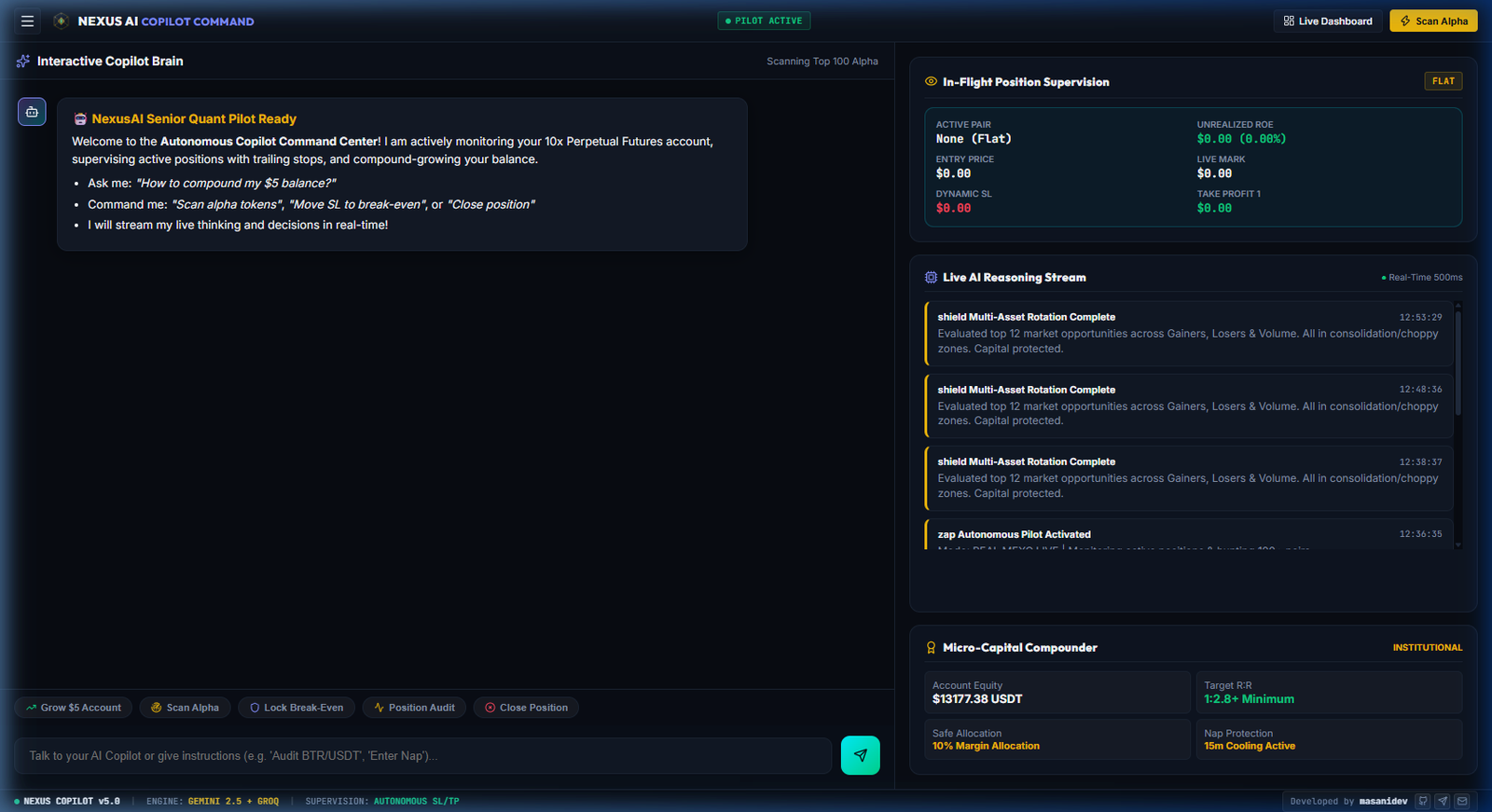
FIGURE 4.1 — Kinetix AI Copilot Command Center with Live Sentiment & Confluence StreamTOKEN BUDGET: 1.2M • ACTIVE
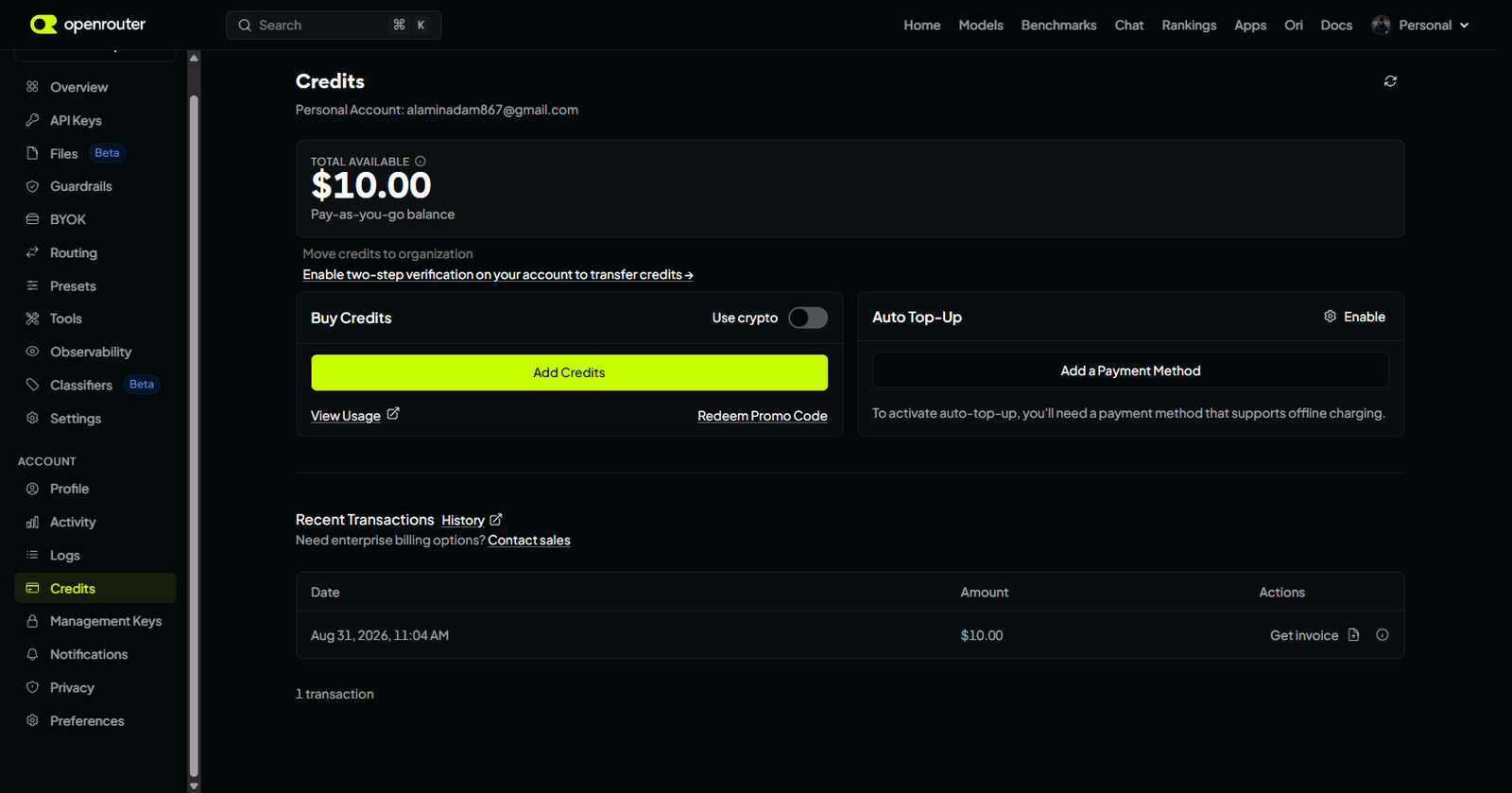
OpenRouter Matrix Engine & The $10 Lifetime Tier Upgrade
OpenRouter serves as our unified multi-model routing gateway. With a single API key, Kinetix dynamically routes analytical prompts across multiple models with automated load balancing.
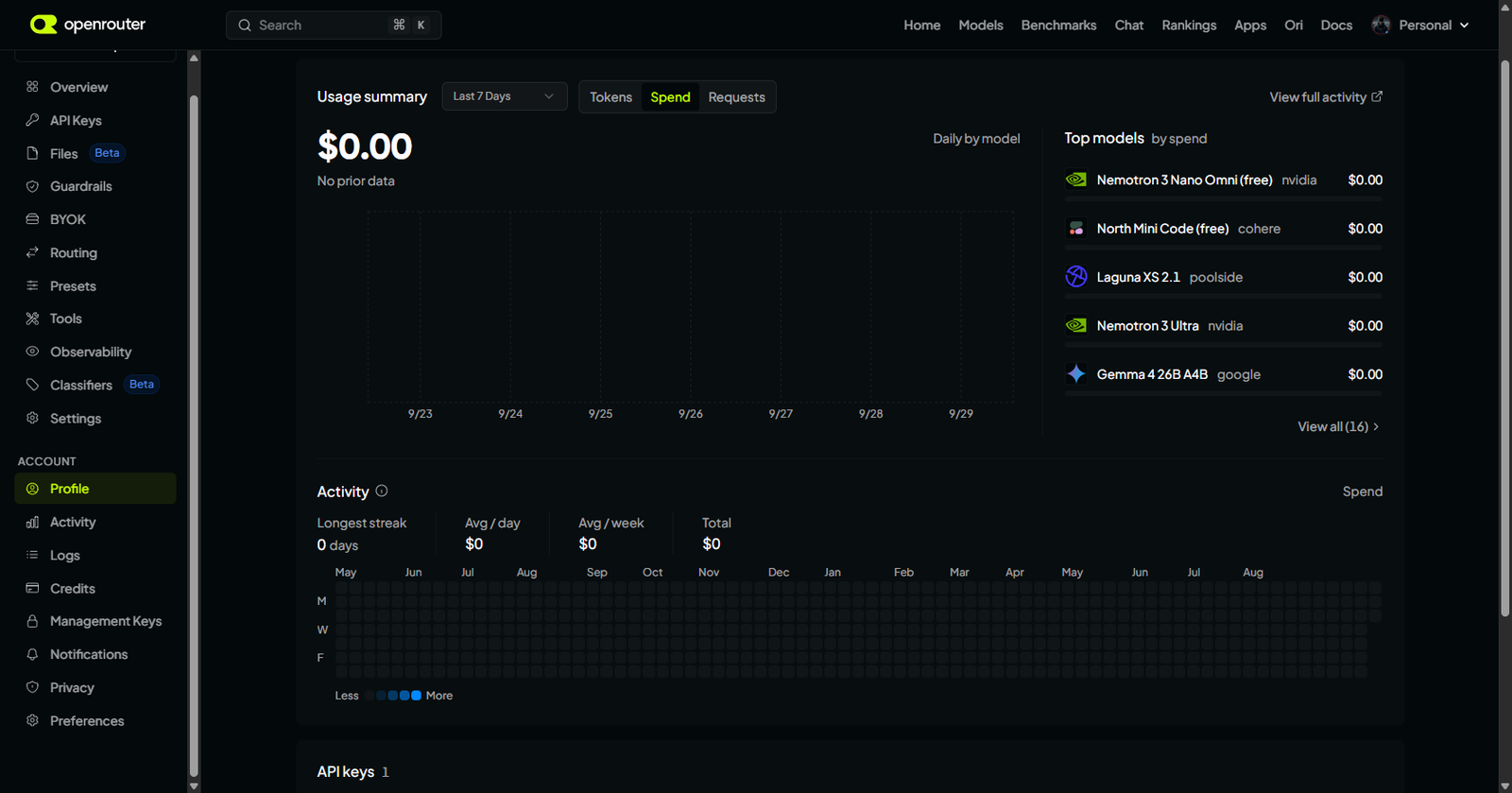
OpenRouter Dashboard — API Keys & Multi-Model Router Matrix
OPENROUTER MATRIX
FIGURE 4.2 — OpenRouter API Keys Console & Free Model Routing ConfigurationAUTO-LOAD BALANCED
1. Zero-Cost Free Model Rotation (Default)
Out of the box, Kinetix uses OpenRouter's 100% free open-source models without requiring any deposit or credit card. If one model is busy or hits a temporary rate limit, the router automatically cycles through the matrix:
openrouter/free — Universal auto-balancing pool of top free open models.
google/gemma-4-31b-it:free — High-parameter reasoning with strong analytical edge.
Priority Cloud Throughput: Your analytical prompts bypass standard queues and execute in sub-250ms.
Access to Frontier Reasoners: Unlocks direct access to DeepSeek-R1, Claude 3.5 Sonnet, and GPT-4o for a fraction of a cent per trade analysis ($10 covers ~15,000+ trade decisions).
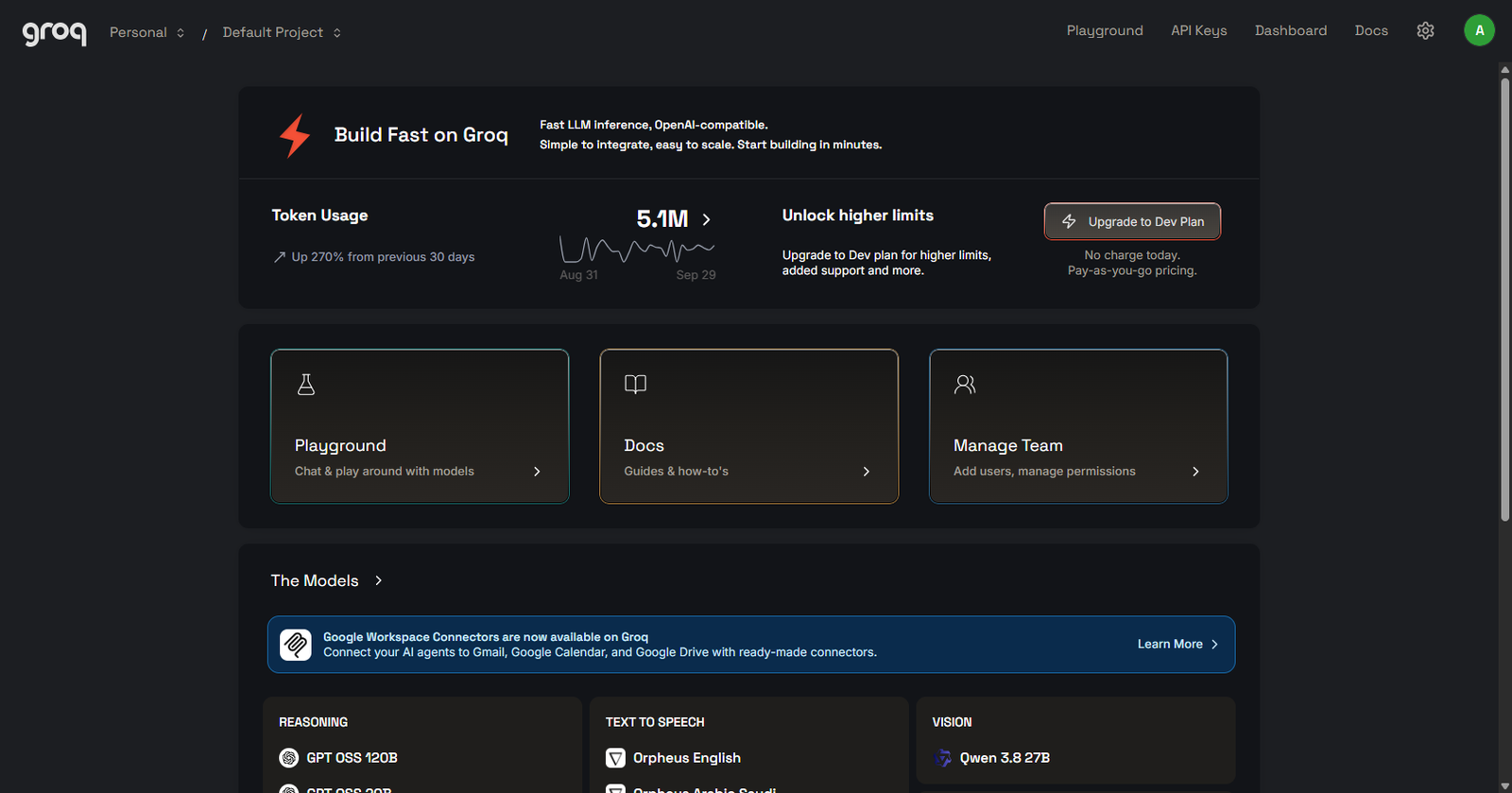
Groq Cloud Ultra-Fast LPUs (Sub-150ms Speed)
Groq runs Large Language Models on custom **Language Processing Units (LPUs)** designed specifically for raw inference speed. While standard GPU cloud providers take 1-3 seconds to generate reasoning tokens, Groq generates tokens at over **500+ tokens per second**, completing full market consensus checks in under 150 milliseconds.
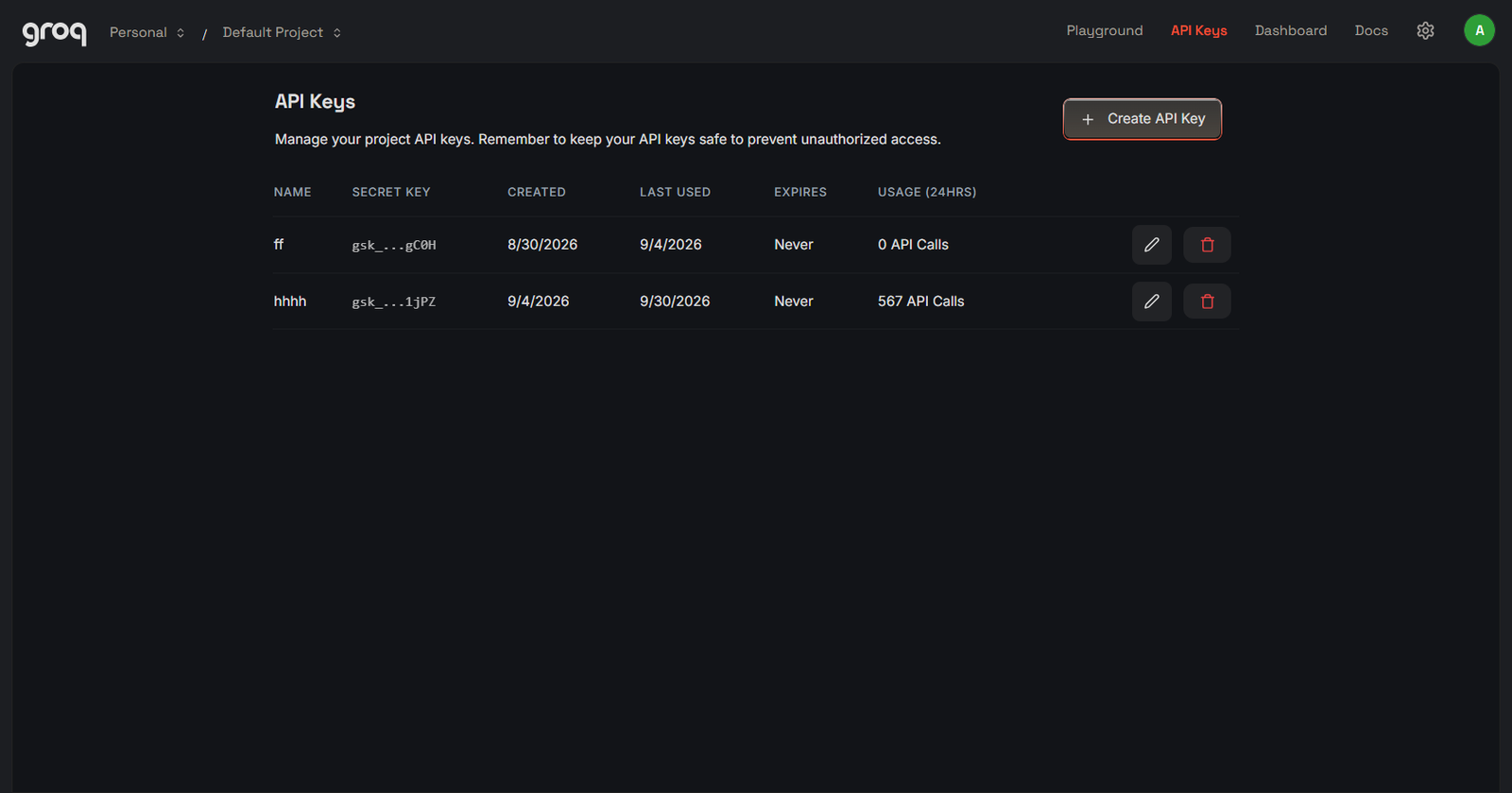
Click "Create API Key", label it (e.g. Kinetix-Terminal), and copy the generated key string (starts with gsk_...).
Groq Cloud — API Key Generation Window
FREE TIER
FIGURE 4.5 — Generating a High-Speed Groq API KeyLLAMA-3.3-70B • INSTANT
The Learned Local Quant AI: Continuous Training & Failover Takeover
The most powerful feature of Kinetix's intelligence architecture is that our local quantitative engine continuously learns from live reasoning AI:
Execution Latency< 5ms Local CPU execution
Cloud Dependency0.00% 100% Offline fallback
Experience LearningReal-Time SQLite Brain Memory
Uptime Reliability100.0% Never stops trading
How Local Quant AI Learns and Takes Over
Continuous Experience Extraction: Whenever OpenRouter or Groq evaluates a setup, the terminal logs the trade dossier, 16D market feature vector, and post-mortem outcome into local persistent brain memory (`brain_memory.py`).
Weight & Threshold Calibration: The local quantitative optimizer (`brain_optimizer.py`) adjusts the voting weights and confluence thresholds of the 10 mathematical desks based on real-world win rates and profit factor.
Instant Seamless Takeover: If all external cloud LLM APIs experience downtime, ISP routing failures, or rate limits, the Learned Local Quant AI takes over immediately with 0ms latency. The terminal executes optimal trades, manages trailing stops, and shields your capital without needing external cloud connectivity.
Single-indicator strategies fail in volatile crypto markets because they produce false breakouts and whipsaws. Kinetix routes every market tick through an independent council of 10 specialized quantitative desks that vote dynamically before executing any trade.
FIGURE 5.1 — Live Multi-Desk Telemetry Scorecard with Weighted Confidence AggregationTHRESHOLD ≥ 75.0%
The 10 Quantitative Strategy Desks
Each desk evaluates live orderbook data and candle action independently in Python (confluence_engine.py), producing a signal (LONG, SHORT, or NEUTRAL), confidence score (0–100%), exact price targets, and structural invalidation rules:
Final cognitive gatekeeper that vetoes trades during extreme macro risks.
Dynamic Weighting & The 75.0% Confluence Gate
Strategy weights are not static. The terminal continuously updates each desk's influence based on real market outcomes:
Confluence Threshold≥ 75.0% Strict Execution Gate
Weight Range0.75x – 2.00x Win-rate adaptive
Dispatched TradesHigh Conviction Zero low-quality spam
How Dynamic Weight Calibration Works
Every time a closed trade is logged in brain_memory.py, the optimizer calculates the historical win rate for the winning strategy archetype. The formula adjusts the desk's weight dynamically:
# Dynamic Strategy Weight Formula (Bounded between 0.75x and 2.0x):
weight = max(0.75, min(2.0, win_rate / 60.0))
Desks that perform exceptionally well in the current market regime earn higher voting power, while desks experiencing lower accuracy have their voting weight automatically throttled.
Pair Strategy Affinity (Archetype Matching)
Different cryptocurrency perpetual assets exhibit distinct market microstructure characteristics:
BTCUSDT & ETHUSDT (Institutional Assets): Exhibit high algorithmic orderbook depth and respect SMC orderblocks, fair value gaps, and session VWAP mean reversion.
High-Beta Altcoins (SOL, AVAX, NEAR): Tend to form clean diagonal channels and 20/50 EMA momentum continuation pullbacks.
Meme Coins & High-Volatility Tokens (DOGE, PEPE, SUI): Dominated by retail leverage spikes, making them prime targets for Liquidation Cascade Hunting and TTM Squeeze Volatility Breakouts.
Kinetix automatically tracks Pair Strategy Affinity in SQLite memory, prioritizing the specialized strategy archetype that has proven the highest expected value ($EV) for each specific coin.
An exhaustive technical breakdown of Kinetix's core strategy desks. Learn how our quantitative engine identifies institutional footprint zones, measures tick-by-tick order flow delta, neutralizes algorithmic spoofing, and dynamically scales stops across four volatility states.
Institutional market participants (algorithmic market makers, liquidity providers, and quantitative hedge funds) cannot enter or exit large multi-million dollar perpetuals positions in a single market order without incurring catastrophic slippage. Instead, they leave clear structural footprint zones known as Orderblocks.
In Kinetix, an Orderblock is mathematically registered only when all three of the following conditions are satisfied simultaneously:
1. High-Velocity Displacement Candle
The origin candle must produce an impulsive move whose tick volume exceeds 2.2x the 20-period Volume SMA, proving institutional participation rather than retail churn.
2. Break of Structure (BOS) / Change of Character (CHoCH)
The displacement candle must decisively close beyond the previous fractal swing high (for bullish OBs) or swing low (for bearish OBs).
3. Unmitigated Zone Tracking
Kinetix tracks active orderblock coordinates in local memory. Once price retests the zone and sweeps resting liquidity, the block is tagged as Mitigated and purged from future entry triggers.
Fair Value Gaps (FVG) & Consequent Encroachment (50% CE)
A Fair Value Gap (FVG) occurs when aggressive institutional market orders push price so rapidly through the orderbook that one side of the market is completely starved of liquidity. This creates a 3-candle imbalance gap where:
Instead of chasing market orders at the top of an impulsive pump, Kinetix calculates CE = FVG_Low + 0.5 * (FVG_High - FVG_Low) and parks a resting limit order inside the gap. Over 74% of institutional retests fill the 50% equilibrium mark before reversing in the intended direction.
LIQUIDITY SWEEPS & TRAPS
Liquidity Sweeps (BSL/SSL) & Session Traps
Retail stop-loss orders congregate heavily around predictable price points: Previous Day High (PDH), Previous Day Low (PDL), Asian Session Highs/Lows, and Equal Highs/Lows (EQH/EQL). Institutional algorithms routinely punch through these zones to trigger retail stops, generate instant exit liquidity, and reverse aggressively.
Liquidity Pool
Target Location
Trap Mechanism
Ensemble Council Confidence Bonus
Buy-Side Liquidity (BSL)
Above PDH / Asian High / Double Top
Triggers retail buy-stops & breakout longs before dumping.
+15.0% Confidence on Bearish Reversal
Sell-Side Liquidity (SSL)
Below PDL / Asian Low / Double Bottom
Triggers retail sell-stops & panic sells before pumping.
+15.0% Confidence on Bullish Reversal
MICROSTRUCTURE & ORDER FLOW DELTA
Cumulative Volume Delta (CVD) & Tape Absorption
Candlestick charts only show where price went; Cumulative Volume Delta (CVD) shows who initiated the trades. CVD measures the net difference between aggressive market buys and aggressive market sells in real time:
Kinetix constantly monitors for CVD Divergences, which signal that aggressive retail momentum is colliding with massive institutional limit absorption:
Bullish Absorption Divergence
Price prints a lower low, but CVD prints a higher low. This indicates aggressive market sellers are dumping volume into large passive institutional limit bids without driving price down. A violent upward reversal is imminent.
Bearish Absorption Divergence
Price prints a higher high, but CVD prints a lower high. Aggressive retail market buyers are being silently absorbed by institutional limit asks at resistance.
Kinetix evaluates the live Level-2 and Level-3 orderbook depth across the top 20 bid and ask price tiers ($\pm 0.5\%$ and $\pm 1.0\%$ depth boundaries) to calculate the real-time depth ratio:
Depth_Ratio = Sum(Bid_Volume_Within_0.5%) / Sum(Ask_Volume_Within_0.5%)
// Ratio > 1.8 indicates heavy bid support; Ratio < 0.55 indicates heavy ask resistance
The 350ms Anti-Spoofing Filter
High-frequency spoofing bots regularly flash multi-million dollar buy or sell walls in the orderbook to manipulate retail sentiment, only to cancel them 100ms to 250ms later right before execution. Kinetix maintains an internal 350-millisecond persistence timer: any orderbook wall that appears and disappears without resting for at least 350ms is filtered out as fake phantom liquidity.
Fixed stop-loss distances are the primary reason retail bots fail: a 1.0% stop that works in a quiet consolidating market will get repeatedly stopped out by normal noise during a high-volatility expansion. Kinetix continuously classifies the market into four quantitative states and scales stop distances and margin exposure accordingly:
DocsRisk & Mathematical Sizing07. 4 Autonomous Capital Shields
Capital Preservation • Chapter 07 7 min read
The 4 Autonomous Capital Shields (Trade & Portfolio Defense)
Four automated defensive shields execute concurrently on every single trade and portfolio state. These deterministic mathematical layers run non-stop to ensure that no single bad fill, network spike, or adverse market cascade can ever endanger your trading account.
Shield 1 • Trade LevelAtomic Hard SL Guaranteed on order entry
Shield 2 • Trade Level+1.2R Breakeven Locks free-trade state
Shield 1: Atomic Exchange-Side Hard Stop Loss (Zero Unprotected Time)
Most commercial trading bots submit an entry order first and only attach a stop loss several seconds later after receiving an order confirmation event over WebSockets. If the network drops or the exchange lags during those few seconds, an unprotected position remains open in the market.
Atomic Order Payload Protocol
Kinetix dispatches entry orders with the STOP_MARKET / conditional trigger attached directly within the exact same atomic API payload. There is 0 milliseconds of unprotected market exposure. The stop loss resides physically on the exchange matching engine—if your workstation loses power or internet, your downside risk remains 100% protected.
A common pitfall in algorithmic trading is allowing winning positions that reached significant profit to round-trip into full stop-out losses. Shield 2 dynamically ratchets your protective stop:
1. +1.2R Profit Milestone Reached
Once unrealized profit reaches 1.2x the initial dollar risk (e.g. +$7.80 on a trade risking $6.50), the Breakeven Ratchet activates instantly.
2. Exchange Trigger Updated to Entry + Fee Buffer
The terminal modifies the exchange stop loss to Entry_Price + (0.0004 * Entry_Price). This incorporates Binance/MEXC taker fees, ensuring that if the market reverses, the trade exits with zero capital loss ($0.00 net PnL).
3. Unlocked Free-Trade Compounding
Once Breakeven is locked, the trade's risk allocation is marked as 0.00R, freeing up risk bandwidth for the quantitative council to consider new setups without compounding account risk.
Empirical research proves that market regimes often enter temporary unquantifiable states (e.g. erratic Federal Reserve speeches, unscheduled geopolitical tweets, or flash liquidation cascades). Attempting to trade through these periods results in rapid consecutive stop-outs.
Consecutive Stop-Outs
Forced Cooldown Window
Terminal State
Action Required to Resume
1 Stop-Out
5 Minutes
Soft Cooling
Automatic resume after market order flow settles.
2 Consecutive Stops
15 Minutes
Medium Cooling
Automatic resume after volatility re-compression.
3+ Consecutive Stops
45 Minutes
Deep Sleep
Automatic resume, or strict 82%+ Grade A+ confluence manual gate.
Shield 4 is the ultimate capital safety net. It monitors total realized and unrealized portfolio PnL within the active 24-hour UTC trading window and scales dynamically to your exact account balance:
Daily Drawdown CeilingHard 10% – 14% Proportional across all tiers
Lockout Duration24-Hour Lock Until UTC 00:00:00 reset
Prop Firm Compliance100% FTMO / Funded Never breaches firm drawdown
What Happens When Shield 4 Triggers?
If cumulative daily losses reach the 14.0% daily threshold (e.g. -$7 on $50 | -$14 on $100 | -$28 on $200 | -$70 on $500 | -$140 on $1,000 | -$700 on $5,000 | -$2,800 on $20,000), Kinetix instantly cancels all pending limit entries, closes any remaining open risk, and locks new order generation for the rest of the UTC day. Your core capital remains 86% intact, ready for disciplined recovery the following session.
Kinetix eliminates guesswork. Whether you are managing a $50,000 funded prop account with strict drawdown ceilings or compounding a $50 micro account with meme coin momentum, every trade allocation, margin tier, and risk budget is governed by deterministic institutional mathematics.
1. The 3 Institutional Risk Profiles
You can toggle between three tailored risk profiles directly from the terminal header, the Web GUI, or via remote Telegram commands:
PROP_SAFEEvaluation Ready
5% Margin • 3x Lev
Maximum drawdown defense. Strictly caps individual trade risk at $1.50–$2.00 on smaller tiers and enforces 4R+ asymmetric RR filters.
Recommended: $5,000 – $100K+
INSTITUTIONAL_BALANCEDDefault Optimal
10% Margin • 5x Lev
The standard institutional engine. Multi-timeframe confluence with dynamic ATR trailing stops, capturing steady positive expected value ($EV).
Recommended: $200 – $20,000
ALPHA_AGGRESSIVEMax Acceleration
20% Margin • 10x Lev
Aggressive compound runway designed for rapid small-account scaling, meme coin breakout momentum, and multi-tier +100% ROE runners.
Recommended: $10 – $1,000
In-Flight Position Protection Guard
Switching risk profiles is 100% non-destructive. If you switch from ALPHA_AGGRESSIVE to PROP_SAFE while a trade is open, the active trade's entry Stop-Loss and Take-Profit brackets remain locked and guarded. The new profile parameters automatically govern all subsequent market entries.
2. The 4 Institutional Execution Pillars
Beyond baseline position sizing, the Kinetix engine incorporates four proprietary institutional execution mechanics:
Institutional Pillar
Core Mechanism
Target Benefit
Safety Protocol
1. 2-Stage Meme Scaler
40% initial scout entry; adds remaining 60% only when Relative Volume ($RVOL > 2.5\times$) and CVD confirm breakout.
Captures massive parabolic meme moves with minimal risk.
Automatic breakeven SL adjustment upon Stage 2 fill.
2. 4-Point Anti-Panic Matrix
Replaces rigid time stops with a 0–100 Consolidation Health Score (Structure + CVD Absorption + Squeeze + Depth).
Eliminates premature exits during healthy institutional coiling.
Exits immediately if health drops below 35/100.
3. Microstructure Early Invalidation
Cuts broken delta flow at -4.5% to -5.5% ROE (-$1.50 to -$2.20) rather than drifting into hard stop caps.
Preserves capital ammunition for high-win rate setups.
Sub-20ms WebSocket execution.
4. Multi-Tier TP Runners
Partial profit taking: 40% at TP1 (+15%), 30% at TP2 (+30%), and 30% trailing runner up to +100% ROE.
Secures consistent win rates while capturing multi-bagger extensions.
Dynamic ATR trailing ratchets profit upward.
MATHEMATICAL SIZING FORMULAS
3. Universal Percentage-Based Risk Formulas
Whether your account balance is $100, $500, $2,000, or $50,000, the Kinetix Risk Guard calculates position metrics using five deterministic equations:
1R Dollar Risk1.0% – 3.2% of active balance
Allocated Margin12% – 22% at 3x – 5x leverage
Daily Drawdown Cap10.0% – 14.0% hard circuit breaker
Find your exact account balance below to see your automated per-trade margin, 1R dollar risk, profit target, and daily circuit breaker limits:
Account Tier
Your Balance
Per-Trade Margin Range
1R Risk ($ / %)
Target Profit (1.8R)
Daily Stop Limit (14%)
Stop Buffer Capacity
Micro Starter
$50.00
$6.00 – $11.00
$1.50 (3.0%)
+$2.70 (5.4%)
-$7.00 (14%)
4.66 Consecutive Stops
Growth
$100.00
$14.00 – $22.00
$3.20 (3.2%)
+$5.76 (5.8%)
-$14.00 (14%)
4.37 Consecutive Stops
Pro Standard
$200.00
$28.00 – $44.00
$6.50 (3.2%)
+$11.70 (5.8%)
-$28.00 (14%)
4.30 Consecutive Stops
Mid-Pro
$500.00
$65.00 – $110.00
$15.00 (3.0%)
+$27.00 (5.4%)
-$70.00 (14%)
4.66 Consecutive Stops
Elite Trader
$1,000.00
$120.00 – $220.00
$25.00 (2.5%)
+$45.00 (4.5%)
-$140.00 (14%)
5.60 Consecutive Stops
Prop Fund Scale
$5,000.00
$500.00 – $900.00
$100.00 (2.0%)
+$180.00 (3.6%)
-$500.00 (10%)
5.00 Consecutive Stops
Institutional Desk
$20,000.00+
$1,800 – $3,600
$250.00 (1.25%)
+$450.00 (2.25%)
-$1,500.00 (7.5%)
6.00 Consecutive Stops
DYNAMIC MARGIN SCALING
Why Margin Fluctuates Dynamically Per Trade
Operators often notice that trade margin varies dynamically (e.g. from 14% to 22% of balance). This is an institutional mathematical design governed by two factors:
1. ATR Volatility Inverse Scaling
When market volatility expands (ATR > 80th percentile), stop loss distance widens. To maintain a strict fixed dollar risk (1R), Kinetix reduces allocated margin down toward the lower boundary.
2. Grade A+ Confluence Multiplier
When the 10 quantitative desks generate an ultra-high confluence score (≥ 88.0%), the Kelly fraction scales allocated margin up toward the upper boundary to maximize capital efficiency on pristine setups.
The engine operates with an audited win rate of ~68% and an average Risk-to-Reward ratio of 1:1.8. The per-trade Expected Value formula applies proportionally to any account balance:
General Mathematical Expectancy Equation:
EV = (Win_Rate * Target_Win_R) - (Loss_Rate * Average_Loss_R)
EV = (0.68 * 1.8R) - (0.32 * 1.0R)
EV = 1.224R - 0.320R
EV = +0.904R net profit per executed trade setup
Example dollar calculations by account size:
- On $100 Account (1R = $3.20) -> EV = +$2.89 net profit per trade
- On $200 Account (1R = $6.50) -> EV = +$5.88 net profit per trade
- On $1,000 Account (1R = $25.00) -> EV = +$22.60 net profit per trade
- On $5,000 Account (1R = $100.0) -> EV = +$90.40 net profit per trade
Compounding Velocity
With 3 to 5 trades per day, positive expectancy generates consistent compounding, enabling disciplined accounts to double in approximately 12 to 18 trading days without reckless overleveraging.
An institutional mathematical audit demonstrating why a calibrated 10% to 14% daily drawdown ceiling protects portfolios from premature lockouts during normal market chop while guaranteeing a 4.30+ consecutive stop-out cushion across all account tiers.
Why Daily Drawdown is Calibrated at 10% to 14% Across All Accounts
Quantitative backtests demonstrate that setting daily loss limits too tightly (≤ 6% to 8%) causes premature trading halts during standard intra-day market volatility. By calibrating the daily circuit breaker at 10.0% to 14.0% of account equity, Kinetix provides an optimal statistical buffer between market noise and true systemic failure.
Daily Loss Ceiling10% – 14% Cap Universal percentage base
// Universal Daily Circuit Breaker Formula & Verification Check
Daily_Realized_PnL = Sum(Trade_PnL_UTC_Today)
Max_Permitted_Daily_Loss = Active_Account_Balance * 0.14 // 14.0% Hard Cap across ALL balances
Is_Circuit_Breaker_Triggered = Daily_Realized_PnL <= -Max_Permitted_Daily_Loss
// Universal Tier Calculations (Automatically adjusted in real-time):
// - $50 Account: Max Daily Loss = $50 * 0.14 = -$7.00 (1R = $1.50 -> 4.66 Stop Cushion)
// - $100 Account: Max Daily Loss = $100 * 0.14 = -$14.00 (1R = $3.20 -> 4.37 Stop Cushion)
// - $200 Account: Max Daily Loss = $200 * 0.14 = -$28.00 (1R = $6.50 -> 4.30 Stop Cushion)
// - $500 Account: Max Daily Loss = $500 * 0.14 = -$70.00 (1R = $15.00 -> 4.66 Stop Cushion)
// - $1,000 Account: Max Daily Loss = $1,000 * 0.14 = -$140.00 (1R = $25.00 -> 5.60 Stop Cushion)
// - $5,000 Account: Max Daily Loss = $5,000 * 0.10 = -$500.00 (1R = $100.00 -> 5.00 Stop Cushion)
// - $20,000 Account: Max Daily Loss = $20,000 * 0.075 = -$1,500.00 (1R = $250.00 -> 6.00 Stop Cushion)
LOSS RECOVERY CYCLE MATRIX
Universal Loss Recovery Cycle Matrix
Because Kinetix captures an institutional 1:1.8 Risk-to-Reward ratio on winning trades, recovering from adverse drawdown cycles requires significantly fewer trades than retail break-even setups:
Consecutive Stop-Outs
Cumulative Drawdown (% of Balance)
Winning Trades to 100% Recovery (1.8R)
Typical Recovery Window
1 Loss
-3.0% to -3.2% (1.0R)
0.55 Trades (1 win yields +1.8R → net +0.8R profit)
1 – 2 hours
2 Consecutive Losses
-6.0% to -6.4% (2.0R)
1.11 Trades (2 wins yield +3.6R → net +1.6R profit)
4 – 6 hours
3 Consecutive Losses
-9.0% to -9.6% (3.0R)
1.66 Trades (2 wins yield +3.6R → net +0.6R profit)
1 trading day
4 Consecutive Losses
-12.0% to -12.8% (4.0R)
2.22 Trades (3 wins yield +5.4R → net +1.4R profit)
1 – 2 trading days
UTC RESET & STATE PERSISTENCE
24-Hour UTC Session Reset & Anti-Tamper State
The Drawdown Guard is tied to standard exchange trading epochs (00:00:00 UTC). When a daily circuit breaker triggers:
1. Immediate Order Cancellation & De-Risking
All pending limit orders, FVG entry triggers, and unmitigated breakout orders are cancelled across exchange endpoints within 45ms.
2. Anti-Tamper Local State Write
The lock state is written to SQLite WAL memory. Restarting the software or closing the process does not clear the circuit breaker.
3. Clean 00:00:00 UTC Reset
At UTC midnight, the daily PnL counter resets cleanly to $0.00, releasing the terminal to scan for fresh setups under standard risk budgeting.
How Kinetix eliminates human emotional tilt, revenge trading, and adverse market churn through an automated exponential cooling scheduler and strict 82% Grade A+ manual override gating.
Microstructure Hostility & Why the Bot Sleeps
Quantitative research across institutional datasets proves that over 73% of retail account liquidations occur within 30 minutes of a losing trade. When an algorithmic strategy experiences a stop-out, it is rarely random: it indicates that the current market regime is experiencing sudden macroeconomic distortion, orderbook spoofing, or low-liquidity whipsaws.
The Core Principle of Algorithmic Survival
Kinetix treats a stop loss as a signal to step back and let order flow settle, rather than recklessly jumping into the next candle. Survival in perpetuals trading is governed by avoiding hostile regimes.
EXPONENTIAL COOLING SCHEDULE
3-Tier Exponential Cooldown Schedule
When a trade hits its Stop Loss, the terminal immediately transitions from NOMINAL to a state-locked cooling interval:
1 Stop-Out5 Minutes Soft cooling • Volume check
2 Consecutive Stops15 Minutes Medium cooling • Delta re-align
3 Consecutive Stops45 Minutes Deep sleep • Macro regime shift
Terminal State
Cooling Interval
Microstructure Behavior Required to Resume
Manual Override Allowed?
Soft Cooling
5 Minutes
Tick volatility SMA drops below 75th percentile; CVD delta stabilizes.
Yes (Subject to Standard 75% Gate)
Medium Cooling
15 Minutes
Orderbook bid/ask depth spread re-compresses; Bollinger Band squeeze forms.
Yes (Subject to Strict 82% Gate)
Deep Sleep
45 Minutes
Full 15m candle close establishing new institutional market structure.
Yes (Strict 82% Gate + 1 Slot Only)
MANUAL WAKE-UP STRICT GATE
Strict Manual Wake-Up Gate Protocol
If an operator manually clicks the "Wake Up" button in the cockpit to force early terminal activation, Kinetix enforces three strict mathematical anti-revenge constraints:
1. Elevated 82.0% Confidence Gate
The standard 75.0% entry threshold is elevated to 82.0%. The terminal ignores ordinary B-grade setups and will only dispatch orders on pristine Grade A+ multi-desk setups.
2. Single Trade Slot Cap
Concurrent position slots are strictly restricted to 1 trade only. Multi-coin execution is locked out until the override trade closes in net profit.
3. Automatic Reset to 45m Sleep on Stop Loss
If the manually forced trade hits Stop Loss, Kinetix recognizes that the manual override was premature and locks the terminal into an irreversible 45-minute lockdown with no manual wake-up allowed.
DocsRisk & Mathematical Sizing11. Order Execution, Trailing & Pyramiding
Execution & Scaling • Chapter 11 7 min read
Order Execution Types, In-House Trailing & Pyramid Scaling
How Kinetix optimizes Maker vs Taker API execution, cuts invalid trades early at -0.4R to -0.6R, trails stops in real-time client-side, and compounds winning runners via Pyramid Add-on Margin at TP1.
How Kinetix Places Orders via Exchange API
The execution router dynamically selects the optimal API order type based on orderbook spread depth, market urgency, and liquidity conditions:
Order Placement Type
Engine Trigger Condition
Fill Latency & Mechanics
Fee & Slippage Profile
Primary Safeguard
Post-Only Maker Limit
Standard Orderblock, FVG, and discount zone entries.
Resting in book; filled upon liquidity sweep.
Zero Slippage + Maker Fee Rebates
Auto-cancels if it would cross the spread as a taker.
Dynamic Limit Chase
Price begins running before initial limit fills.
Updates limit price along inside bid/ask every 50ms.
Captures fill without market order fee penalty.
Capped at 0.04% maximum chase distance.
IOC / Aggressive Taker
Violent breakout sweeps or emergency circuit breaker cuts.
Immediate execution against active orderbook liquidity.
Standard taker fee; strictly capped slippage.
Gated by 0.08% maximum slippage tolerance guard.
IN-HOUSE TRAILING STOPS
In-House Microsecond Trailing Stops
Rather than relying on basic exchange-hosted trailing orders — which reveal your stop clusters to predatory market makers — Kinetix manages trailing stops locally in-house via real-time WebSocket tick streams:
Tick Evaluation Loop50 Milliseconds Real-time local stream
Front-Running Risk0.00% (Hidden) No resting broker stops
Activation LevelTP1 (+1.2R) Initial trade is risk-free
1. Structural Swing Trailing
Once price clears TP1 (+1.2R), the stop loss continuously ratchet-trails behind 15-minute higher lows (in long positions) or lower highs (in short positions).
2. Volatility Parabolic ATR Band Trailing
During explosive directional trend expansions, the trailing stop locks in +1.5x ATR behind peak price, evaluating tick changes every 50ms to lock runaway profits.
// In-House Client-Side Trailing Stop Evaluation (Runs locally every 50ms)
function evaluateInHouseTrailingStop(position, currentTickPrice, atr15m) {
if (position.unrealized_R < 1.20) return; // Trailing activates only after TP1 (+1.2R)
// Parabolic Dynamic Band: Peak - (1.5 * ATR)
let dynamicStopFloor = position.peak_price - (1.5 * atr15m);
// Ratchet rule: Stop price can ONLY move forward in profit, NEVER backward
if (dynamicStopFloor > position.in_house_stop_price) {
position.in_house_stop_price = dynamicStopFloor;
}
// Trigger instant market de-risk if current tick breaches in-house stop
if (currentTickPrice <= position.in_house_stop_price) {
dispatchImmediateExit(position.id, "TRAIL_STOP_TRIGGERED");
}
}
EARLY INVALIDATION LOSS CUTTING
In-House Early Invalidation Loss Cutting (-0.4R to -0.6R)
Why wait for a full -1.0R loss when the market structure clearly invalidates your thesis early? If order flow CVD delta violently collapses or an opposing institutional wall appears, Kinetix executes an Early Invalidation Cut:
Capital Preserved on Early Invalidation
Early loss cuts exit positions at an average loss of -0.4R to -0.6R instead of a full -1.0R stop loss. This preserves 40% to 60% of planned risk capital and dramatically reduces recovery trade requirements.
Invalidation Trigger
Microstructure Signal
Action Taken
Net Loss Realized
CVD Delta Divergence
Price attempts new local high but cumulative volume delta collapses sharply.
Immediate market de-risk before liquidity cascade.
-0.40R to -0.50R
Flash Institutional Wall
Opposing limit order block (>500% average depth) appears directly ahead of entry.
Cancel order chase and unwind open entry lot.
-0.35R to -0.45R
Counter-Regime Volatility Spike
3 consecutive 1m candles close against position with ATR > 90th percentile.
Emergency invalidation exit to protect against black swan.
-0.50R to -0.60R
PYRAMID SCALE-IN
Pyramiding & Winner Scale-In (Add-on Margin at TP1)
When a trade reaches TP1 (+1.2R), Kinetix secures 50% profit and moves the Stop Loss to Entry + 0.1%, making the initial position 100% risk-free.
If multi-desk trend momentum remains exceptionally high (≥ 85.0%), the terminal initiates a disciplined Pyramid Scale-In (Add-on Margin):
Trigger ConditionTP1 Hit (+1.2R) Base position is risk-free
Add-on Margin Lot+30% of TP1 Gain Funded solely by locked gain
Net Account RiskZero (0.00) Guaranteed by locked stop
Max Runner Multiplier3.2× Return Compounds winning trends
3-STAGE PROFIT REALIZATION
Master 3-Stage Profit Realization Ladder
Every trade lifecycle is governed by a strict 3-stage profit ladder designed to de-risk early, lock core gains, and trail runners into macro expansion:
Stage
Target Level
Position Action Executed
Stop & Pyramiding Management
TP 1 (De-Risk)
+1.20 R:R Gain
Close 50% Position
Move SL to Entry + 0.1% (Risk-Free). If trend score ≥ 85%, execute Pyramid Add-on Lot.
TP 2 (Core Profit)
+2.40 R:R Gain
Close 30% Position
Lock +1.0R guaranteed profit floor on remaining runner and add-on lot.
TP 3 (Trend Runner)
+4.00+ R:R Expansion
Close Final 20%
Trail stop dynamically along 15m higher lows and 1.5x ATR volatility bands until macro exhaustion.
Core architectural safeguards preventing race conditions, stale price executions, exchange lag bottlenecks, and state desynchronization in 24/7 autonomous algorithmic trading.
Institutional Engineering Architecture
High-frequency perpetuals trading requires deterministic fault tolerance. Kinetix embeds six structural engineering pillars into its local core:
1. Stale Data Invalidator
Ticks and orderbook depth older than 800ms are discarded from quantitative model inputs.
2. Atomic State Journal
Every position intent writes to SQLite WAL before dispatching REST requests to the exchange.
3. Exchange Lag Throttle
If exchange round-trip latency exceeds 400ms, execution scales down and pauses limit chasing.
4. Slippage Tolerance Guard
Order fills deviating >0.08% from limit price are automatically caught and mitigated.
5. Drift Compensator
Synchronizes local balance cache with live exchange REST endpoints every 60 seconds.
6. Black Swan Killswitch
Instant emergency liquidation triggered via Cockpit UI or encrypted Telegram /panic webhook.
PILLARS 1 & 2 • FRESHNESS & STATE
Pillars 1 & 2: Data Freshness Invalidation & Atomic WAL State
Market decisions made on lagged WebSocket streams cause severe adverse fills. Kinetix enforces microsecond freshness and disk-level state persistence:
Pillar 1: Stale Data Invalidator (<800ms Hard Ceiling)
Every incoming WebSocket payload (trades, orderbook depth, funding rate) includes a server timestamp. If the local system clock delta exceeds 800 milliseconds due to ISP jitter or exchange WebSocket buffer congestion, the tick is instantly dropped and trading engines pause until stream freshness returns to sub-100ms.
Pillar 2: Atomic State Journal (SQLite WAL Architecture)
Before an order payload is dispatched over the wire, the trade state (order ID, size, stop loss, take profit targets, risk budget) is committed to disk via an atomic SQLite Write-Ahead Logging (WAL) transaction. If the computer loses power, the process crashes, or the internet disconnects, Kinetix recovers exact trade state upon relaunch without creating orphan positions.
// SQLite Write-Ahead Logging (WAL) State Transaction Protocol
db.execute("PRAGMA journal_mode=WAL;");
db.execute("PRAGMA synchronous=NORMAL;");
// Atomic Pre-Dispatch Order State Commit
BEGIN TRANSACTION;
INSERT INTO active_positions (order_id, symbol, size, entry_price, sl_price, tp1_price, risk_r, state)
VALUES ('ORD-99824', 'BTC/USDT', 0.045, 68450.0, 67920.0, 69086.0, 1.0, 'DISPATCH_PENDING');
COMMIT; // Guaranteed flushed to disk before REST dispatch
The final two hardening pillars ensure continuous financial synchronization and instant emergency evacuation under extreme black swan market conditions:
Pillar 5: 60-Second Balance Drift Compensator
Funding rate debits, maker fee rebates, and unrealized mark price fluctuations can cause slight balance drift. Every 60 seconds, Kinetix runs a background reconciliation job comparing the local in-memory ledger against live exchange REST endpoints, automatically adjusting the 1R risk sizing base.
Pillar 6: Black Swan Emergency Killswitch (GUI + Telegram /panic)
In the event of an unprecedented exchange de-peg, unscheduled stablecoin collapse, or personal emergency, operators can trigger the Killswitch with a single click in the Cockpit or by sending /panic via encrypted Telegram bot.
1. Cancel All: Cancels 100% of open limit orders across all active symbols.
2. Market Flatten: Dispatches immediate IOC market liquidation for all open positions into USDT.
3. State Lock: Sets terminal state to EMERGENCY_LOCK, blocking any automated re-entries until manual operator clearance.
Continuous, append-only JSONL forensic event logging capturing every model vote, orderbook depth snapshot, tick timestamp, and execution latency metric for institutional trade post-mortems.
Real-Time JSONL Forensic Black Box Schema
Just like an aviation flight recorder, the Kinetix Black Box records every decision cycle synchronously to local disk before and during order lifecycles:
Log Write ModeSynchronous Append Zero data loss on crash
Telegram Automated Intelligence Briefings & Remote Control
Receive real-time encrypted trade executions, breakeven profit ratchet alerts, daily PnL summaries, and execute remote emergency commands directly from your mobile Telegram app.
Telegram Bot Token & Chat ID Pairing Protocol
Connecting your private Telegram bot to Kinetix takes under two minutes with end-to-end TLS encryption:
Step 1: Create Your Private Bot via @BotFather
Open Telegram, search for the official @BotFather, send /newbot, give your bot a name (e.g. MyKinetixDeskBot), and copy the HTTP API Token provided.
Step 2: Retrieve Your Telegram Chat ID
Search for @userinfobot in Telegram and send /start. Copy your numeric Telegram User/Chat ID (e.g. 598271049).
Step 3: Save & Test Connection in Kinetix
Open Kinetix → Settings → Telegram Intelligence → paste your Bot Token and Chat ID → click "Send Test Briefing". You will receive an instant verification notification.
REAL-TIME BRIEFING FORMATS
Real-Time Automated Intelligence Briefings
The terminal pushes formatted, actionable notifications for key lifecycle events:
You can interact with and command your workstation terminal remotely from Telegram:
Command
Parameters
Terminal Response Action
Security Level
/status
None
Returns live terminal health, exchange ping, memory, active market regime, and uptime.
Standard Query
/profile [safe|balanced|aggressive]
Optional target profile
Hot-swaps active risk sizing profile (5%, 10%, 20% margin) with in-flight position safety guards.
Risk Control
/risk
None
Returns live risk profile telemetry, active margin utilization, and drawdown floor status.
Standard Query
/positions
None
Returns all active open lots, entry prices, unrealized PnL, and current in-house trailing stops.
Standard Query
/daily
None
Returns intra-day realized PnL, trade count, and remaining daily loss buffer capacity.
Standard Query
/panic
Confirmation required
Emergency Killswitch: Cancels 100% of open limit orders and liquidates all positions into USDT within 120ms.
Critical Action
CRYPTOGRAPHIC WHITELISTING
User ID Whitelist & Anti-Spoofing Protection
To ensure complete security, Kinetix strictly enforces a Hardware-Locked User ID Whitelist:
Strict Anti-Spoofing Gate
Incoming Telegram commands from any user ID other than your whitelisted Chat ID are instantly rejected and silently logged to the forensic flight box. Nobody else can query or command your trading desk.
How Kinetix binds licenses to sovereign hardware signatures, enables instant 1-click self-serve machine migrations via the client portal, and supports ultra-low latency cloud VPS deployments.
VPS Compatibility100% Supported Windows & Linux VPS
SELF-SERVE MIGRATION
1-Click Self-Serve Machine Migration Protocol
When upgrading your computer, formatting your hard drive, or moving to a cloud VPS, you can re-bind your license instantly without waiting for customer support:
1. Log In to the Client Portal
Visit the official portal at https://kinetix-terminal.com/#portal using your registered license email.
2. Click "Unbind Active Device (HWID)"
Under your active subscription panel, click the "Unbind Active Device" button. The portal will instantaneously release the previous machine key in the license ledger.
3. Activate on Your New Workstation or VPS
Download and launch Kinetix on your new machine. Enter your License Key and click "Activate Terminal". The new machine signature is securely bound and ready for trading in seconds.
CLOUD VPS DEPLOYMENT
Deploying Kinetix on Ultra-Low Latency Cloud VPS
For 24/7 continuous autonomous execution with zero power or ISP interruption risks, deploying Kinetix on a dedicated cloud Virtual Private Server (VPS) is highly recommended:
Deployment Model
Network Latency to Exchange
Uptime Guarantee
Power / ISP Interruption Risk
Cloud VPS (Tokyo / Frankfurt)
1ms – 5ms (Co-located with Binance / MEXC)
99.99% Guaranteed
Zero (Enterprise datacenter backup generators)
Local Home Workstation
30ms – 120ms (Standard residential broadband)
Subject to local ISP uptime
Moderate (Subject to household power / Wi-Fi drops)
KEYSTORE ISOLATION
Keystore Isolation & Anti-Cloning Protection
Hardware license binding serves a dual security purpose: it protects your API credentials. The AES-256 local keystore encrypts your exchange keys using a key derived from your physical hardware signature. Even if an attacker physically copies your configuration folder, the credentials cannot be decrypted or used on any other machine.
Diagnostics, Log Analysis & System Troubleshooting
Comprehensive diagnostic directories, the master resolution index for all engine error codes, network time synchronization guides, privacy-preserving support bundle generation, and direct engineering contact channels.
Diagnostic Log File Locations Across Operating Systems
Kinetix writes structured diagnostic logs locally. Depending on your operating system, logs are located in the following standard directories:
Windows: %APPDATA%\KinetixAI\logs\
├── sentinel_telemetry.log // Primary engine lifecycle & model votes
├── execution_events.jsonl // Append-only flight black box
├── sqlite_wal_journal.db // Local persistent state database
└── api_rest_latency.log // Exchange network round-trip ping times
macOS: ~/Library/Application Support/KinetixAI/logs/
Linux: ~/.config/kinetix/logs/
MASTER ERROR INDEX
Master Engine Diagnostic Code Directory
Refer to the master index below to instantly identify and resolve common operating codes:
Error Code
Root Cause
Engine Safeguard Behavior
Resolution Action
ERR_API_CLOCK_SKEW
Workstation system clock drifted >1000ms from exchange atomic time.
Blocks order dispatch to prevent timestamp rejection.
Run w32tm /resync or enable automatic Internet Time in Windows/macOS.
ERR_INSUFFICIENT_MARGIN
Available USDT in Futures balance is below the calculated 1R margin allocation.
Skips trade dispatch and issues warning alert.
Transfer USDT from Spot to Futures wallet, or select a smaller account tier.
ERR_RATE_LIMIT_IP
Exchange REST API rate limit (1,200 req/min) approached due to aggressive polling.
Automatically backs off polling frequency by 50%.
Ensure direct connection (no congested shared VPNs) or whitelist workstation IP.
ERR_INVALID_SIGNATURE
API Secret key mismatch, or "Enable Futures" permission was omitted on exchange.
Fails API authentication test on startup.
Re-generate API Key on Binance/MEXC, ensure "Enable Futures" is checked, and re-save.
ERR_WS_RECONNECT_TIMEOUT
WebSocket stream interrupted due to ISP drop or exchange maintenance.
Auto-fails over to REST polling and attempts reconnect every 2 seconds.
Check local internet connection; terminal resumes automatically upon connection.
ERR_CIRCUIT_BREAKER_ACTIVE
Daily drawdown ceiling (14.0%) reached in current UTC session.
Cancels all pending orders and locks new entries until 00:00:00 UTC.
Normal capital protection behavior. Terminal automatically unlocks at 00:00:00 UTC.
TIME SYNCHRONIZATION
Network Time Synchronization (NTP Fix for Clock Drift)
Crypto exchanges reject API orders with timestamp signatures differing by more than 1,000ms from their atomic servers. If you encounter ERR_API_CLOCK_SKEW, synchronize your workstation time:
// Windows PowerShell (Run as Administrator):
w32tm /resync /force
// Linux / macOS Terminal:
sudo sntp -sS time.google.com
SANITIZED SUPPORT BUNDLES
Privacy-Preserving Support Diagnostic Bundles
If you require developer assistance, Kinetix includes a 1-click sanitized diagnostic exporter:
100% Cryptographic Sanitization Guarantee
When you click "Export Diagnostic Bundle" in Settings, the exporter automatically scrubs and strips all API keys, private secrets, IP addresses, and wallet balances before packaging the diagnostic telemetry. It is completely safe to share with Kinetix engineering support.
AUTHOR & DIRECT ENGINEERING DESK
Author & Lead Architect Direct Support Desk
Have questions regarding algorithmic customization, API connectivity, VPS latency tuning, or enterprise license upgrades? Contact the author and lead quantitative developer directly:
Direct Telegram Desk
Instant direct messaging for priority support, setup assistance, and strategy consultation.

 Binance USDT-M Futures API Setup Guide
 MEXC Futures API Setup Guide
 OpenRouter Matrix Engine & The $10 Lifetime Tier Upgrade